Introduction: Still Not Showing Up in ‘Near Me’ Searches? Here’s Why
You’ve done everything “right” — set up your Google Business Profile, added your hours, uploaded photos, maybe even got a few reviews.
But when someone nearby searches for “dentist near me” or “best café near me,” your business is nowhere to be seen.
The truth?
“Near Me” SEO in 2025 isn’t just about having a listing. It’s about sending the right proximity signals, having hyperlocal content, and aligning with how Google’s local algorithm actually works now.
In this guide, we’ll break down exactly:
- What Google looks for in “near me” queries today
- How your competitors are outranking you
- And what fixes you can implement this month
Let’s dive into what’s changed — and how to catch up.
1. The Evolution of “Near Me” Searches in 2025
Search behavior isn’t what it used to be. Back in 2018, adding “near me” to your content title was enough to ride the local SEO wave.
Today, Google’s local algorithm doesn’t need the words “near me” to understand proximity intent — it already knows based on:
- Searcher’s device location
- Google Maps behavior
- Business proximity and credibility
- Schema, page content, and mobile loading speed
In fact, with AI-powered summaries and real-time personalization, Google now customizes map results based on context, search history, and local engagement data.
Stat: 83% of local “near me” searches result in a visit within 24 hours. If you’re not visible, you’re not considered.

2. What Are “Near Me” Searches? (And Why They Don’t Always Say ‘Near Me’)
What Are “Near Me” Searches?
“Near Me” searches are location-intent queries where users expect to discover businesses or services in close proximity to their current location. These searches are commonly performed on mobile devices and include terms like “restaurants near me,” “dentist nearby,” or “best gym near me.”
“Near Me” searches refer to location-intent queries — where the user is looking for a product, service, or business in close proximity.
But here’s the catch:
Users don’t always type “near me” anymore. They just expect results to be local.
For example:
- Instead of “plumber near me,” users now type “emergency plumber”
- Instead of “café near me,” they search “best latte open now”
- Instead of “doctor near me,” it’s “orthopedic clinic”
Google interprets these as proximity-based searches by default. So your visibility doesn’t rely on exact-match keywords — it relies on:
- Your Google Business Profile
- Your website’s local signals
- Your reputation and engagement signals
If your business doesn’t show up on these, you’re not “in the neighborhood” as far as Google’s AI is concerned.
Then vs Now: How ‘Near Me’ Search Phrases Have Evolved
| Old ‘Near Me’ Search Phrase | Modern Proximity Search Phrase (2025) | What’s Changed |
| “Best salon near me” | “Haircut open now nearby” | Intent is more urgent, |
| “Restaurants near me” | “Healthy lunch spots open now” | Users seek niche services + real-time info |
| “Doctor near me” | “Pediatrician accepting patients in [area]” | Personalization + availability matter |
| “Bakery near me” | “Vegan cake shop near [location] open today” | Local + dietary preference + opening hours |
| “Gym near me” | “24×7 fitness center with parking near me” | Feature-based proximity searches |
| “Dentist near me” | “Emergency dental clinic near me now” | Urgency and service-type refined |
| “Cafe near me” | “Quiet cafe for work near [neighborhood]” | Contextual need influences phrase |
| “Plumber near me” | “Licensed plumber with reviews in [area]” | Trust signals (like reviews) matter more |
3. How Google’s Proximity Algorithm Works in 2025
Google’s proximity algorithm determines how “close” a business is to a user—not just physically, but also contextually and behaviorally. In 2025, this algorithm is AI-enhanced, using real-time signals, user intent, and engagement history to deliver ultra-local results.
Key Ranking Signals for “Near Me” Searches:
| Ranking Factors | Description |
| User Location (Geo-coordinates) | Google pinpoints the user’s exact GPS location (especially on mobile). |
| Proximity Radius | Typically 2–5 miles in cities, up to 20 miles in rural areas. |
| GBP Optimization | Fully filled-out profiles, business hours, categories, images, reviews. |
| Local Relevance | Does your content match local intent and include geo-modifiers? |
| Engagement Signals | Clicks, calls, direction requests, review responses, photo views. |
| Velocity of Updates | Frequent GBP updates (photos, posts, Q&A) are strong freshness signals. |
| Entity Recognition & Schema | How well your business is connected to local search entities (via schema, citations, backlinks). |
How AI Has Changed Proximity Search
- Google now groups user behavior, such as repeated visits or search choices, to determine what shows up first in “near me” results.
- Voice search and contextual signal influences the map pack on a per-user base.
- Businesses with stronger entity presence and structured data tend to rank more consistently across different locations.
(Also Read: SEO Activities That Still Matter in the AI Search Era)
Example:
A user in Ahmedabad searches for “urgent doctor near me” at 11 PM.
Google will prioritize businesses that:
- Are marked “Open Now”
- Have updated photos and services in their GBP
- Have consistent NAP citations across local directories
- Received recent reviews with keywords like “emergency” or “late night”
4. Technical Optimization for Proximity Searches
To appear in “near me” search results, your site and Google Business Profile (GBP) require more than keywords—precision, consistency, and crawlability.
Here’s the technical groundwork that allows search engines to connect your business with users in the area.
1. Maintain NAP Consistency
Your NAP data must be:
- Exactly the same across your website, GBP, social media, and directories
- Placed in schema markup (LocalBusiness) on your homepage and contact page
- Verified on key local directories like Justdial, Sulekha, IndiaMART, and Bing Places
Pro Tip: Even minor differences like “St.” vs “Street” can hurt trust signals in Google’s local index.

2. Embed Google Maps & Location-Specific Schema
- Use an embedded map of your business location to signal relevance.
- Implement LocalBusiness schema with:
- Address
- Geo-coordinates
- Business hours
- Services offered
- SameAs URLs for social profiles

Also Read: How to Embed a Map)
3. Optimize Local Landing Pages
Every business location should have its own optimized page:
- Include city/service keywords (e.g., “Best Digital Marketing Firm in Ahmedabad”)
- Add customer reviews, photos, team info, and directions
- Use internal linking to connect to the main “Locations” or “Service Area” page
Example: A chain salon should have unique content for each outlet—”Haircut in Bandra” and “Haircut in Juhu” shouldn’t lead to the same page.
4. Speed & Mobile-Friendliness
Google prioritizes businesses that:
- Load in under 2.5 seconds
- Are fully responsive (text doesn’t require zoom, CTAs are tappable)
- Use compressed images and lazy loading for media
You can use Google PageSpeed Insights to check performance.
5. Avoid Common Technical Errors
- Broken links, outdated redirects, or orphaned location pages
- Missing XML sitemaps or incorrect robots.txt rules blocking crawl
- Duplicate content across multi-location page
Struggling to rank in proximity-based searches?
we’ve helped brands crack the “near me” code with proven strategies and location-first SEO.
5: How to Create Content That Ranks in ‘Near Me’ Searches
“Near Me” content strategies involve creating location-aware, intent-matching, and experience-rich content that signals proximity to Google. It helps your business appear in local packs, AI snippets, and voice searches—even without explicitly using “near me” keywords.
A) Hyperlocal Landing Pages
- Create pages targeting each specific service area (e.g., “Plumber in Bandra” instead of just “Mumbai”).
- Include nearby landmarks, neighborhood names, or directions from known points.
Example: “Best Jewellery Shop Near Shyamal Cross Roads, Ahmedabad”
B) Local FAQs That Reflect Spoken Queries
- Utilize FAQs that resemble the way people speak.
- Examples:
- “Where is a dentist open now near me?”
- “Best AC repair nearby with weekend availability?”
Add these FAQs to GBP, service pages, and blog content with FAQ Schema.
(Also Read: Local Business FAQs)
C) Embed Local Reviews & Testimonials
- Highlight location-tagged customer stories.
- Example: “Sarah from Andheri said our team reached in just 30 minutes!”
- Use Google Review embeds or quote cards.

D) Geo-Tagged Images in Content
- Use original photos tagged with location metadata (especially team, service area, storefront).
- Bonus: Mention surrounding businesses or landmarks in captions for local relevance.
E) Leverage Local News and Events in Content
- Post blogs timely such as “How to Get Your House Ready for Ahmedabad’s Monsoon” if you are a home services brand.
- This shows real-time relevance and community connection.
F) ‘Near Me’ Service Roundups
- Create blog content like:
- “Top 5 Physiotherapists Near Bopal – 2025 Edition”
- “Where to Buy Organic Groceries Near Satellite Road”
These rank well in SGE snippets and answer common hyperlocal queries.
G) Localized Internal Linking Structure
- Link related location pages to each other (ex: Andheri → Bandra → Lower Parel service pages).
- Helps Google understand your local content hierarchy and improve crawlability.
Tip: Even without using the words “near me,” you can win proximity searches by embedding proximity signals like:
- Business schema with areaServed
- Store hours, neighborhood references, maps, and direction info
- Voice-search-optimized titles (e.g., “Where to find.”, “Best nearby…”)
(Also Read: How to Optimize Voice Search)
6: Mobile Optimization for Proximity Search
Mobile optimization for proximity search means ensuring that your site loads fast, functions seamlessly, and displays critical local information clearly on mobile devices—because most “near me” searches happen on the go.
Over 70% of local intent searches come from mobile devices. And Google prioritizes mobile-friendly, fast-loading pages with tappable CTAs in both traditional and AI-powered local results.
If your site isn’t mobile-first, you’re not just missing users—you’re missing the algorithm’s green flag for “near me” visibility.

Mobile Optimization Strategies That Boost “Near Me” Ranking:

A) Mobile-First Layout Design
- Ensure your design reacts to all screen sizes—especially smaller phones.
- Important features such as navigation, CTAs (like call, directions), and address details need to be above the fold.
B) Tappable Local CTAs
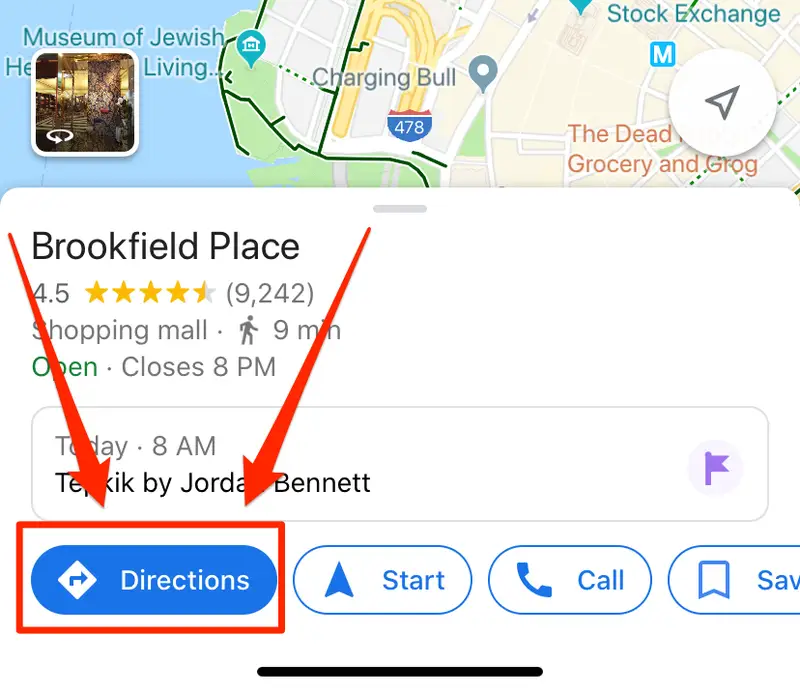
- Use “Call Now,” “Get Directions,” “Book Appointment” buttons with a large, thumb-friendly design.
- Add these directly in the header or sticky bottom bar for maximum conversions.
C) Fast Page Speed = Higher Visibility
- Audit your mobile performance using PageSpeed Insights.
- Optimize images, resources, and cut render-blocking JavaScript.
- Pages under <2.5 seconds load time rank higher on mobile local results.
D) Click-to-Call Functionality
Make sure your phone number has a hyperlink with tel: tag.
<a href=”tel:+916353245259″> Call Now
</a>
Bonus: Google AI can pull for mobile snippets and voice search.
E) Sticky Location Info or Floating Map
- Add a floating “View on Map” or “ Directions” button.
- Helps mobile users instantly act on their location-based intent.
F) Structured Mobile Header for Local
- Include:
- Business name
- City/service area
- Primary CTA (Call/Book/Get Directions)

G) Voice Search Compatibility
- Use conversational H2s like:
- “Where can I find a salon open near me?”
- “Top-rated cafes near Thaltej?”
- Keep sentences short and scannable—think mobile and voice together.
7: Local Schema Markup Implementation
Local schema markup is code you add to the HTML on your site that tells search engines about your business’s local properties—such as name, address, phone, hours, and service area.
In 2025, search engines based on AI depend on structured data to understand and verify local entities. Without schema, Google may misinterpret your business’s relevance to proximity-based queries.
Proper implementation of LocalBusiness and GeoCoordinates schema amplifies your visibility in:
- Google Maps
- AI Overviews
- Voice search results
- “Near me” auto-suggestions
And when Google knows where you are and what you do—it’s more likely to rank you near users with intent.
Must-Have Schema Types for “Near Me” SEO
| Schema Type | Purpose | Implementation Tips |
| LocalBusiness | Describes your business, address, phone, hours | Add to homepage and contact page |
| PostalAddress | NAP consistency across platforms | Match Google Business Profile EXACTLY |
| GeoCoordinates | Tells Google where your business is located | Use latitude and longitude from Maps |
| Service | Lists your offerings clearly | Helps match service-specific searches |
| Review | Displays star ratings in results | Mark up reviews from real customers |
| OpeningHoursSpecification | Shows your working hours in search | Update for holidays too |
Measuring proximity search performance involves monitoring how well your business is performing and ranking for location-intent searches such as “near me” or “[service] nearby.” It encompasses visibility in Google Maps, local 3-Pack, and offline actions such as calls, directions, or website visits.
(Also Read: Local Schema)
8: Tracking Performance of ‘Near Me’ Optimization
Metrics to Track (With Tools)
| Metric | What It Tells You | How to Track |
| Map Pack Visibility | If you are ranking in the top 3 of “near me” keywords? | Tools like Local Falcon or BrightLocal |
| Search Radius | How far from your store users can find you | Use Local Viking’s geo-grid tracking |
| Google Business Profile Insights | Track calls, directions, photo views, and website clicks | Inside GBP Dashboard |
| UTM-tagged Website Clicks | Which location drove what traffic | Google Analytics with UTM parameters |
| Review Growth Rate | Engagement and trust signals | Monitor via GBP or tools like GatherUp |
| Post Engagement | Views and clicks on GBP posts | Available under “Posts” in GBP |
| Mobile vs Desktop Searches | Understand device behavior for local intent | GA4 + Search Console segmentation |
Example KPI Goals (For 60 Days):
- +15% direction requests from GBP
- Rank within 3 miles for top “near me” queries
- Post 2 updates/week to increase GBP engagement
- 10% growth in photo views with seasonal uploads
- Improve Maps ranking from position #7 to #3
Final Takeaway: You’re Closer to Ranking Than You Think
“Near me” searches are not only about where you are anymore — they’re about how assertively your digital footprint responds.
The brands that will win local visibility are the ones that act local, think mobile, and optimize continuously. Because in a world where search is smarter, faster, and more intuitive, it’s not enough to be near— you have to be the one they see first.