Introduction:
Why You Need to Track Google Analytics 4 Traffic Sources
In 2025, knowing how users find your site is more than helpful—it’s mission-critical. Whether you’re scaling SEO, testing paid campaigns, or analyzing email performance, GA4’s traffic source data drives better decisions, faster.
Google Analytics 4 (GA4) offers a more event-based, user-focused method of measuring your website’s performance—but its true worth is in knowing your traffic sources.
GA4 traffic sources show which platforms and campaigns bring visitors to your site. These insights help digital marketers manage budgets, improve content, and focus on what works.
In this blog, we will explain GA4’s traffic channel metrics, how to read the GA4 acquisition report, and what each channel means for your marketing strategy.
What is GA4?
Universal Analytics has been replaced by Google Analytics 4. It monitors app and web activity as events, user behavior, and machine learning-driven insights.

It replaces Universal Analytics and introduces:
- Event-based data model (no session reliance)
- Cross device and cross platform user tracking.
- Machine learning integration and predictive insights
- Improved funnel and user journey analysis
In GA4, understanding traffic sources means going beyond just “where users came from”. It’s about how they entered your funnel and what influenced their visit
Key Shift: GA4 doesn’t just track pageviews—it tracks complete user journeys across devices and platforms
What Are Traffic Channels in GA4?
GA4 traffic channels organize your users based on how they reached your site. This way you can track what’s working and where to make changes.
Each visit is tagged with:
- Source (e.g., Google, Facebook)
- Medium (e.g., organic, cpc, referral)
- Channel (automated grouping like “Organic Search”)
Google’s channel definitions are more standardized in GA4, improving cross-channel attribution and eliminating misclassified visits that often plagued Universal Analytics.
Key Traffic Channels Metrics in GA4:
Understanding how users reach your website is important for refining your marketing strategy — and GA4 traffic sources offer a structured way to do that. GA4 automatically categorizes incoming traffic into predefined channels, helping marketers to measure acquisition performance at glance.
Let us discuss some of the most significant traffic channels in GA4, how they are measured, why they are crucial, and how to leverage them in your favor.
1. GA4 Organic Traffic

Unpaid search engine listings are the source of organic traffic. When the medium is marked as organic, this SEO-driven traffic shows up in GA4.
Why does GA4 Organic Traffic matter?
This is your best measure of SEO performance. If organic sessions are increasing, it generally indicates your content is ranking well for good keywords, pulling in qualified users who are actively looking for your services or data.
How is it Useful for Marketers:
- Identifies which landing pages and search intents drive the most qualified leads
- Highlights SEO wins across geographies or service categories
- Offers a scalable way to grow without increasing ad spend
- Helps benchmark content effectiveness in non-branded searches
2. GA4 Direct Traffic

Users who use bookmarks, enter a website URL straight into their browser, or originate from channels that GA4 is unable to monitor, like untagged PDFs or encrypted apps, are all considered direct traffic.
Why does GA4 Direct Traffic matter?
It signals brand awareness, repeat visitation, or gaps in UTM tagging. An increase in direct traffic may reflect loyalty — or data tracking issues that mask true acquisition sources.
How is it Useful for Marketers:
- Measures brand recall and offline marketing effectiveness
- Flags misconfigured or missing campaign tracking
- Helps segment loyal or high-intent repeat users
- Useful for monitoring return visitors in email or social campaigns that lack UTM tracking
3. GA4 Referral Traffic

Aside from search engines and pay-per-click advertising, referral traffic tracks visitors to your website who arrive after clicking on a link on another website. Press releases, directories, partner websites, and blog mentions are examples of common sources.
Why does GA4 Referral Traffic matter?
It demonstrates how well your off-page SEO and brand reach are working. High referral traffic often correlates with strong backlinks and digital PR.
How is it Useful for Marketers:
- Measures the performance of digital PR and affiliate campaigns
- Identifies backlink opportunities from high-traffic sites
- Supports reputation building and audience diversification
- Informs partnership strategies through real user data
Example: A local chamber of commerce listing that sends 50+ monthly visitors to your homepage is a valuable partnership worth nurturing.
4. Google Analytics Paid

This traffic includes sessions from paid search campaigns such as Google Ads, Meta Ads, LinkedIn Ads, etc., provided UTMs are correctly implemented.
Why does Google Analytics Paid Traffic matter?
It allows you to measure the return on your ad spend, determine user behavior from campaigns, and compare the quality of paid visitors versus organic or social traffic.
How is it Useful for Marketers:
- Associates campaign spend with on-site interaction and conversion
- Compares different ad platforms and targeting strategies
- Helps in improving funnel flow, CTAs, and UX according to engagement depth.
- Supports attribution modeling and ROI reporting for stakeholders
5. GA4 Social Media Traffic

GA4 groups traffic from platforms like Facebook, Instagram, LinkedIn, X (formerly Twitter), Pinterest, and YouTube under the “Organic Social” or “Paid Social” channels, depending on tagging.
Why does GA4 Social Media Traffic matter?
Social traffic helps you evaluate content visibility, engagement, and conversion performance on various social channels.
How it’s useful for marketers:
- Identifies which social platforms drive meaningful traffic
- Helps customize social content for traffic-generating formats
- Differentiates between viral reach and targeted engagement
- Monitoring performance of social media campaigns over time
Scenario: If Instagram Stories generate more clicks but less engaged sessions than LinkedIn posts, adjust your content to that effect.
6. Google Analytics Email Traffic

This channel consists of visitors from email campaigns. It only works when emails are tagged properly with UTM parameters.
Why does Google Analytics Email Traffic matter?
It’s a vital metric for email marketing teams to assess open-click behavior, campaign success, and list engagement.
How it’s useful for marketers:
- Measures newsletter effectiveness in driving web sessions
- Informs segmentation strategy based on user behavior
- Tracks how email traffic compares to other acquisition channels
- Helps optimize email CTAs, subject lines, and send times
- Monitors user paths from inbox to conversion
7. Sessions

A session is a user visiting your site from when they first arrive until they leave.
Why Sessions matter:
Sessions offer a high-level look at traffic volume and how well your pages attract clicks from each channel.
How it’s useful for marketers:
- Evaluates campaign reach and frequency
- Identifies top entry points and landing pages
- Helps correlate spikes in activity with specific campaigns
8. Users & New Users

The number of different or unique visitors to a website is referred to as users metrics. New Users Metrics are the new users, first-time visitors to the site during a given date range.
Why User metrics matter:
They reveal audience composition and acquisition success. A high new user count often indicates successful outreach, while returning users suggest loyalty or funnel re-engagement.
How it’s useful for marketers:
- Tracks success of acquisition channels (SEO, ads, email)
- Helps segment behavior by user type (new vs. returning)
- Supports lifetime value calculations and funnel analysis
9. Engagement Rate & Engaged Sessions
Engagement Rate is the percentage of 10+ second sessions with 1+ conversion event, or 2+ pageviews. Engaged Sessions is another related metric where the total number of sessions meets the engagement criteria.
Why Engagement Rate metrics matter:
Engagement Rate replaces bounce rate with more meaningful insights on actual interaction and content quality.
How it’s useful for marketers:
- Indicates how compelling your landing pages and CTAs are
- Evaluates session quality across acquisition channels
- Helps optimize UX, CTAs, and funnel flow based on engagement depth
Tip: Use this to compare channels; if organic traffic is more engaging than sponsored, focus more on SEO.
10. Average Time Per Session

Average Time Per Session metrics tracks how long users spend during a single session — indicating content consumption depth and overall session stickiness.
Why it matters:
The longer users stay, the more value they’re extracting — often correlating with higher intent and conversion probability.
How it’s useful for marketers:
- Evaluates long-form content and blog performance
- Signals interest level from different traffic sources
- Helps prioritize high-retention pages for lead-gen campaigns
Want help setting up GA4 reports that actually guide strategy?
Talk to our experts today!
GA4 Traffic Acquisition Report: Accurately Analyze Traffic Channels

The GA4 Traffic Acquisition Report is a built-in dashboard that shows how users discover your website — breaking down visits by source, medium, and campaign. It gives a bird’s-eye view of Google Analytics 4 traffic sources, helping marketers analyze how effective each channel is at driving quality engagement.
In contrast to older Universal Analytics reports, GA4’s acquisition view focuses on user-based metrics (like new users) and session-based metrics (like engaged sessions) — allowing for deeper behavioral insights across your funnel.
Also Read: Traffic Acquisition Report
You can find it under:
Reports > Acquisition > Traffic acquisition

Why the Traffic Acquisition Report in GA4 Important for Marketers
The traffic acquisition report in GA4 is your go-to for answering essential marketing questions like:
- Where are my visitors coming from?
- Which source/medium brings in the most engaged users?
- Which campaigns are underperforming?
- Are we acquiring new users or only engaging returning ones?
This report empowers marketers to:
- Compare all traffic channel performance (organic, direct, social, etc.)
- Segment data by dimensions such as country, platform, or device
- Correlate behavior (like engagement or conversions) with traffic origin
- Attribute ROI to specific acquisition efforts, especially paid campaigns
How to View GA4 Acquisition Report:
When you open the GA4 acquisition report, a table with columns for:
- Sessions
- New Users
- Engaged Sessions
- Engagement Rate
- Conversions
- Event Count
When you open the GA4 acquisition report, a table with columns for:
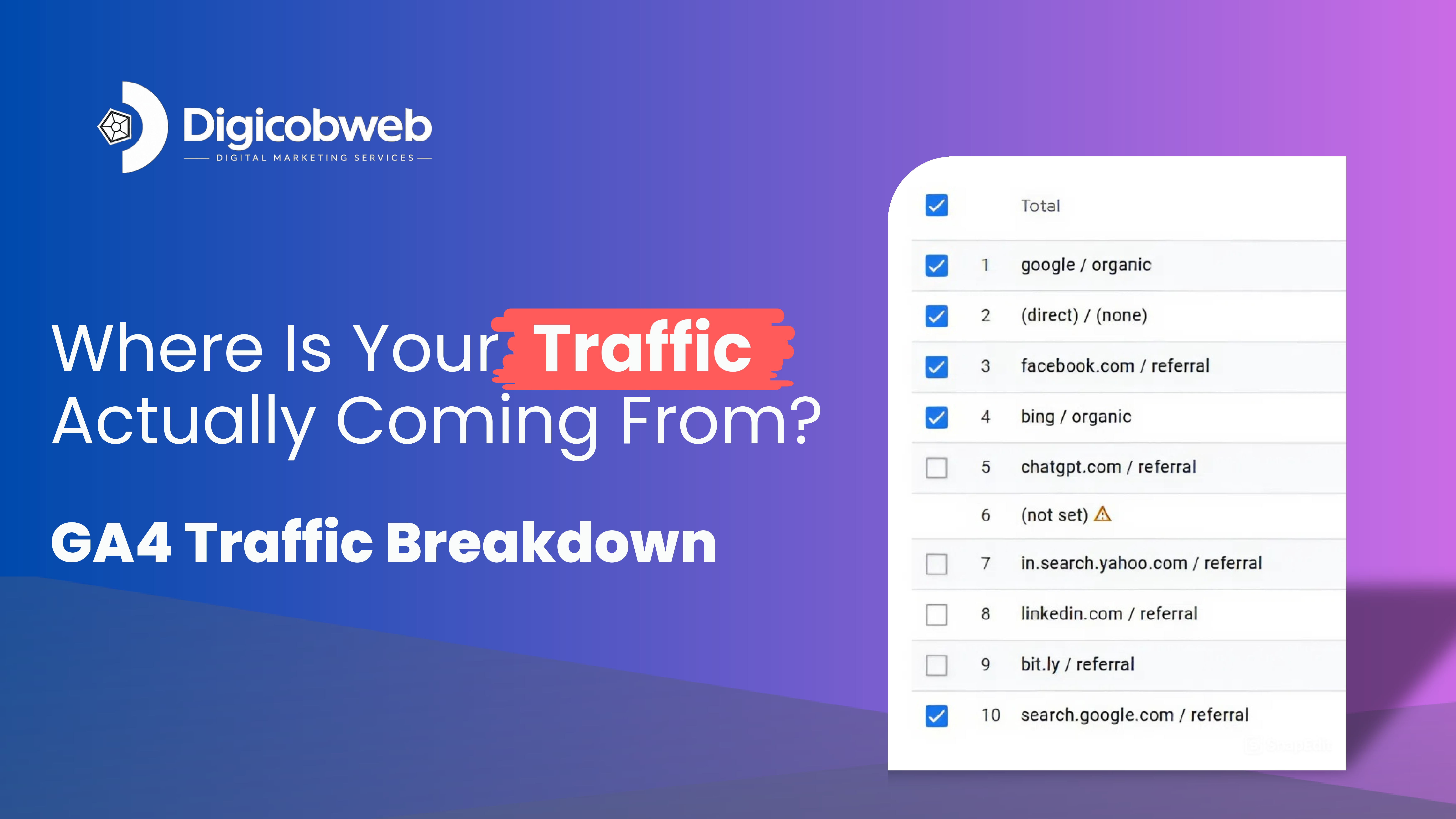
Each row represents a source/medium, such as:
- google/ organic (SEO traffic)
- direct/ (none) (direct visits)
- facebook/ referral (social traffic)
- newsletter/ email (email marketing)
To see how each Google Analytics 4 traffic source impacts engagement, retention, and conversion objectives, marketers can sort and filter this data.
How to Improve Marketing Strategies with Traffic Acquisition Data
This isn’t just a report; it’s your campaign command center. Marketers can use the GA4 acquisition report to obtain strategic insights in the following ways:
- Give High-Performing Channels Priority
Determine which traffic channels result in the most engagement, then allot funds and time appropriately. - Improve Underwhelming Campaign Outcomes
To identify underperforming emails, ads, or referrals, use metrics such as engagement rate. - Align Paid Search and SEO Techniques
To improve landing page experience, messaging, and keyword targeting, compare paid and organic search. - Build Funnel Insights
Tie traffic source data to downstream behavior: Do social users sign up more? Does organic traffic convert faster? - Report with Confidence
Deliver actionable reporting to stakeholders by showing which efforts drive real business outcomes — not just pageviews.
Conclusion: Why GA4 Traffic Source Analysis Should Be a Priority
In 2025, it won’t be enough to simply know how many visitors your website has.
You need to know:
- Where they came from
- What they did on your site
- How valuable they are to your goals
That’s what GA4’s traffic acquisition report— whether you’re managing SEO for a franchise, running social ads, or scaling email outreach.
GA4’s traffic acquisition insights aren’t just numbers — they help you prioritize what works, cut what doesn’t, and maximize every click across your funnel.
Metrics like engagement rate, average session duration, and new users can help you make better marketing decisions rather than relying solely on intuition.