
Introduction
Visibility is not about content but about clarity. And that clarity begins with the way your site communicates business information to search engines.
Schema tells Google (and AI-based tools like Search Generative Experience) about your company, its address, its services, and how much people trust it.
But most of these businesses are missing out on this through using only NAP consistency or citations—without structured data, search engines lack a standardized way of authenticating and pushing your local presence.
This blog is your hands-on guide to implementing local schema the right way. Even if you are managing a single location or dozens of them,
You’ll learn:
- How to use LocalBusiness structured data with Google’s preferred format: JSON-LD
- How to scale schema for multi-location brands
- How to add Review, Offer, and Event schema for deeper visibility
- How to validate, monitor, and measure the impact of schema markup on your search performance
By the end, you’ll have a full understanding of how to structure your business data for maximum trust, visibility, and conversion potential in local SERPs.
1. Local Schema Fundamentals
Schema markup is a type of structured data that helps search engines understand content meaning on your website. Schema is important locally when doing local SEO for verifying your business location, services offered, phone numbers, and trust indicators.
What is Local Schema Markup?
Local schema markup is code that you implement on your site—often in JSON-LD format—declaring your business a brick-and-mortar, local company. It tells Google things like
- Your business name, type, and services
- Physical address and contact details
- Opening hours and areas served
- Customer reviews and ratings
- Events, offers, or promotions
This is implemented using the LocalBusiness schema, a subtype of schema.org/Organization for businesses with a physical presence.
Why It Matters for Local SEO
Without schema, Google may struggle to confirm and connect all your local signals—especially if your listings, website, and GMB (Google Business Profile) use slightly different formats.
With local schema markup:
- Your business can appear in rich results like knowledge panels, FAQ dropdowns, and review stars
- Google can confidently associate your website with your Google Business Profile and local citations
- AI systems like SGE (Search Generative Experience) can extract structured facts for overviews and summaries
Google’s Recommendation: Use JSON-LD
Google has now officially endorsed JSON-LD (JavaScript Object Notation for Linked Data) as the schema format of choice because it has a more polished syntax and fewer maintenance requirements. It’s also more AI-friendly and easier to update across pages and templates.
2. Local Business Schema Implementation
The Local Business schema is the backbone of structured data for local SEO. It helps search engines recognize your business as a verified, geo-relevant entity with essential details tied to a physical location.
What Is Local Business Schema?
Local Business is a specific subtype of the broader Organization schema found within schema.org. It includes all basic organizational details but adds geo-specific attributes that allow your business to be eligible for local search features like Maps, local pack, and rich results.
Using the right subtype gives Google additional topical relevance, which supports rankings in both traditional and AI-generated local results.
Key Properties to Include
Here’s a checklist of recommended fields when implementing LocalBusiness schema:
| Property | Required | Description |
| type | yes | Must be @LocalBusiness@ or a Relevant Subtype |
| name | yes | Your Business Name |
| address | yes | Include street, locality, region, postal code, and country. |
| telephone | yes | Public Business Number |
| opening hours | yes | Weekly schedule in ISO 8601 format |
| url | yes | Your business website URL |
| image | yes | Business logo or feature image |
| same as | optional | Links to social media or other listings |
| price range | optional | General price category (e.g., “$$”, “$$$”) |
| geo | optional | Latitude and longitude |
| aggregate rating | optional | Combined rating score from multiple reviews |
| review | optional | Individual customer reviews |
Sample JSON-LD Code example (For Website)
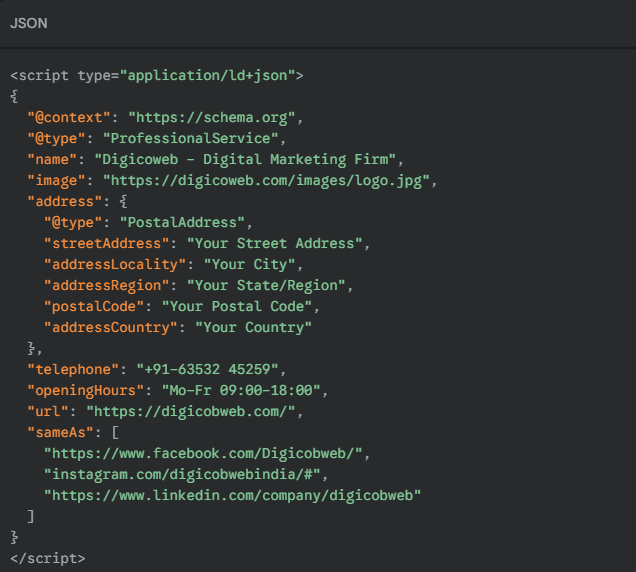
Implementation Tips
- Use the correct schema subtype based on your business category.
- Ensure your NAP (Name, Address, Phone) in the schema exactly matches your Google Business Profile and directory listings.
- Enhance your homepage and key local landing pages with schema.
- Place it in the <head> or at the bottom of <body>—both are crawlable by Google.
3. Multiple Location Schema Strategies
If your business serves more than one geographic area, implementing schema markup for multiple locations can be tricky—but when done right, it significantly increases visibility across local packs and map results.
Can You Use One Page for Multiple Locations?
Technically, yes—but it’s not recommended.
Google and other search engines prefer one schema entity per location page. Combining several LocalBusiness entries on a single URL can confuse crawlers and weaken location relevance.
Best Practice:
Create a different landing page for each location with a different Local Business schema markup with that address, phone number, and hours.
Implementation Options for Multi-Location Schema
Option 1: One Page per Location + One Schema Each
Each page must include:
- Page-specific LocalBusiness schema
- NAP info matching that location
- Reviews and offers relevant to the branch
Use When:
You have 3+ branches or operate in different cities with unique services.
Option 2: Parent Organization + Multiple Locations
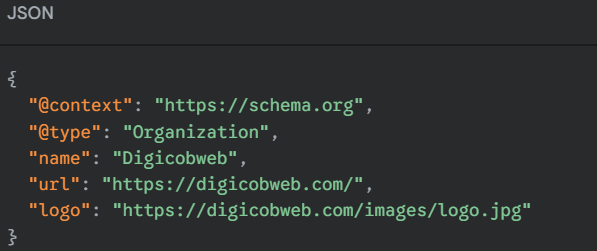
In some cases, you can use an Organization schema at the root domain level and add references to different LocalBusiness locations via structured URLs or nested objects.
Use When:
You’re a national brand with a centralized website and dozens of locations managed through a store locator system.
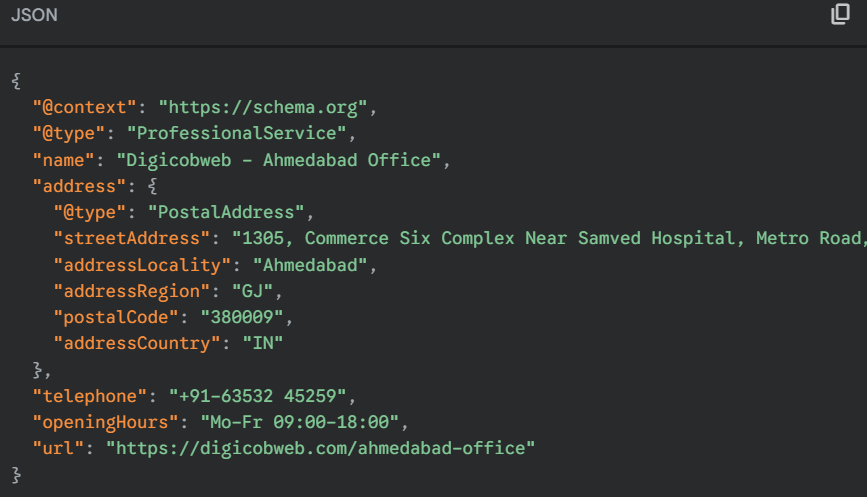
Schema Nesting Strategy Example
On the homepage, include your organization schema:
Then, on each location page, include this:
Mistakes to Avoid
- Using a single schema for multiple addresses on one page
- Not matching NAP across schema, GBP, and page content
- Forgetting to update structured data during location moves or rebrands
Managing schema across multiple locations manually?
Talk to our local SEO experts!
4. Review and Aggregate Rating Schema
Reviews online are one of the most powerful signals of search engine and consumer trust. Through proper use of schema markup, you can make reviews work harder by creating rich snippets with customer reviews, ratings, and stars showing up right inside the results.
This increases clicks and conveys brand authority in an instant—particularly in local search packages and AI-generated abstracts.
What Is a Review Schema?

Review schema (Review or AggregateRating) is a structured data type used to highlight individual customer feedback or an overall rating for a product, service, or business.
Example: Aggregate Rating Schema
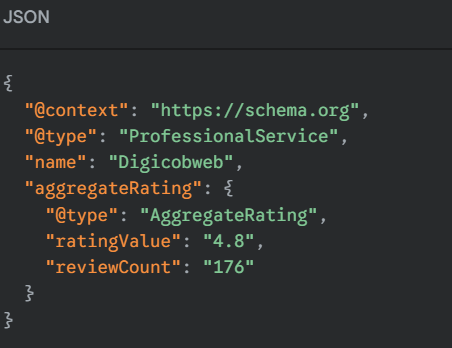
This tells Google that your business has 176 reviews with an average score of 4.8—which may qualify for rich snippets in organic and map-based results.
Where to Place Review Schema
- On the location-specific landing page (not sitewide)
- In the same content block that displays visible reviews on-page
- AggregateRating is used only when you’re focusing on real customer reviews (as per Google guidelines)
Individual Review and Aggregate Rating
Not all review markups are created equal—and choosing the right schema type can determine whether your business earns rich result visibility in local search.
Here’s how the two compare:
| Features | Individual Review | Aggregated Rating |
| Use Case | Highlight a single testimonial | Summarize multiple customer ratings |
| Rich Results Eligibility | No—does not trigger rating stars in SERPs | Yes—may trigger stars and ratings in SERPs |
| Placement Best Practice | Product/service pages with one visible review | Location, service, or homepage with visible average rating |
| Common Mistake | Using review markup without showing the content | Marking up ratings not visible on the page |
| Example JSON-LD | { “@type”: “Review”, … } | { “@type”: “Review”, … } |
When to Use Each:
- Use Review if you’re displaying an individual testimonial, case study, or review quote—but note it won’t show stars in search.
- Use AggregateRating when you show an average rating based on multiple user reviews, with the review count and score visible on the same page.
Search Engine Tip: Google only displays rich results when the data is visible to users and structured properly. Invisible or fake reviews will result in disqualification from review snippets.
SEO Benefits of Review Schema
- Enhanced SERP appearance with rating stars
- Higher CTRs on local landing pages
- Improved AI summarization for branded queries
- Reinforced topical trust and user experience
5. Event and Offer Schema for Local Businesses
Local businesses often host events, offer promotions, or run time-bound services—and properly marking them up with schema can significantly enhance visibility in local search and AI-generated results. Event and offer schema types help Google extract specific details like dates, availability, and pricing directly into SERPs.
a. Event Schema
The Event schema is ideal for:
- Workshops or seminars
- Product launches
- Seasonal or holiday events
- In-store activations or community events
Example JSON-LD for an Event Schema:
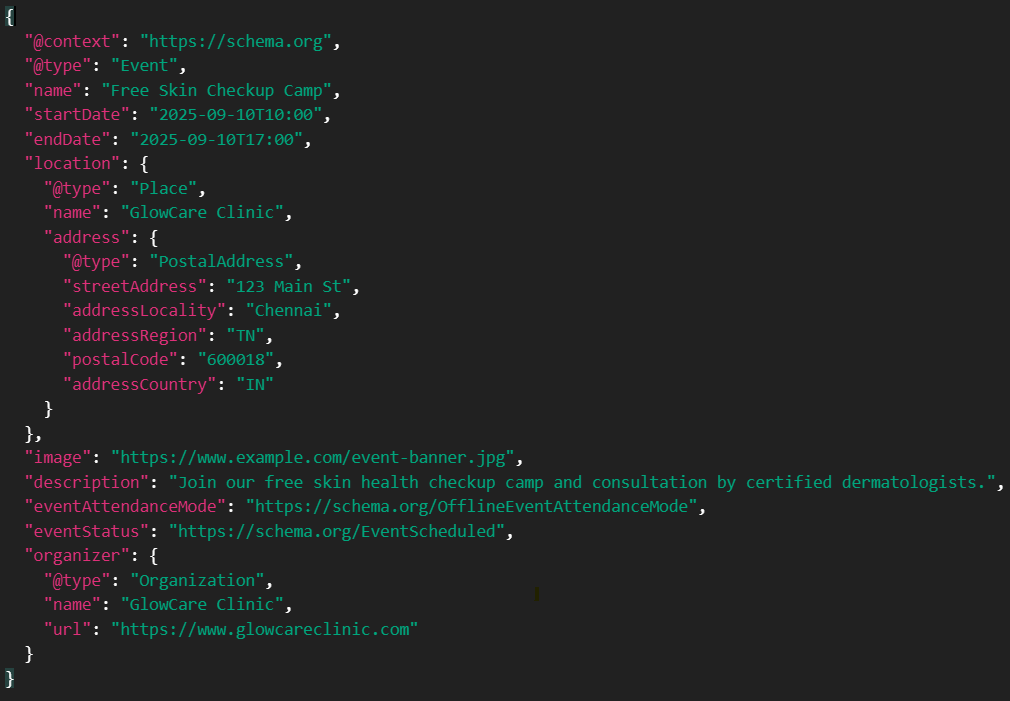
SEO Practices:
- Utilize event information (date, time, location) that can be read on the page.
- Don’t mark up expired or past events.
- Always match schema data with visible page content.
b. Offer Schema
Use the Offer schema to highlight:
- Short-term Promotions
- Discount codes
- Bundled pricing (e.g., “2-for-1 deal”)
- First-time customer specials
Example JSON-LD for a Local Offer:
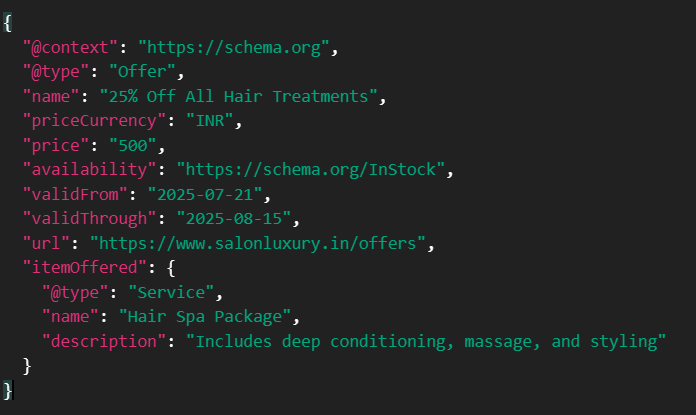
SEO Impact of Offer Schema:
- May generate rich snippets displaying price and availability
- Increases click-through rates for competitive offers
- Enhances Google Shopping and SGE card integration (if applicable)
6. Schema Validation and Testing
Local schema markup only works if it is machine-readable and free of errors. That is where validation and testing enter the picture—ensuring your structured data is in the proper format, tied to on-page content, and rich results pass in SERPs.
Why do schema validations?
- Ensures your JSON-LD or microdata is technically correct
- Helps avoid markup-related penalties or deindexing
- Confirms your page is eligible for rich results, AI overviews, and knowledge panel support
- Detects warnings that may affect Google’s ability to crawl or understand your schema
So, after adding LocalBusiness, Review, or Event schema… How do you know it works?
Google displays rich results or trusted structured data in AI Overviews only if it understands and accepts your markups. So validating your schema is very important.
This ensures that:
- Your code is clean and correct
- Search engines can actually read it
- You don’t accidentally mislead Google (which could hurt visibility)
What Most People Get Wrong About Schema Validation
- “No errors” does not mean it is correct: A technically correct schema can still be missing required or recommended fields (e.g., no opening hours, no price, no geo data).
- Schema should match your on-page content: If you post a review rating without showing a review on the page, Google will probably disregard the markup.
- You can have a schema but still not get rich results: Google decides what to show based on context, trust, and competition—not just the presence of markup.
Real-World Validation Scenarios
Here’s how real developers and SEOs spot and fix schema issues:
Scenario 1: No price in a local offer schema
Problem: Google says your schema is valid, but no rich results appear.
Fix: Add “price”: “449.99” and “priceCurrency”: “INR” to your Offer block
Scenario 2: Review schema doesn’t show rich stars
Problem: You have AggregateRating, but it’s not visible in search.
Fix: Confirm the review is displayed on the page (Google needs visible user-generated content)
Scenario 3: Schema breaks the page
Problem: Page loads blank after schema update.
Fix: Use JSONLint or browser console to debug unclosed brackets, invalid characters, or copy-paste issues
What Google Really Wants to See
- Clean and error-free JSON-LD (preferred by Google over Microdata)
- Content that matches your markup (visible review, product, event, etc.)
- Real-world, complete data: address, hours, rating, images, service area
- No attempt to game results with fake ratings or hidden markup
Schema Validation Tips from the Field
- Start small—test schema on a single URL before scaling site-wide
- Use real data (not “example.com” or random names) or Google may ignore it
- Revalidate every time you update your business hours, service area, or review widgets
- Analyze Google Search Console for enhancement reports like “LocalBusiness enhancement.”
7. Schema Monitoring and Maintenance: Keeping Your Markup Healthy Over Time
Schema markup is not a one-time thing that you do and then just ignore—it’s a continual requirement. Similar to GBP optimization or NAP consistency, your structured data must stay up-to-date, current, and in view to keep serving local SEO and AI-driven search visibility.
Why Schema Maintenance Remains Applicable
Even if your JSON-LD was perfect when you added it, lots of things can go wrong over time:
- A programmer accidentally deletes it while reengineering or refactoring the code
- Business info changes (e.g., hours, location, services), but schema doesn’t get updated
- Google’s schema requirements change, and old markup no longer qualifies for rich results
- Third-party plugins or CMS changes disrupt your structured data output
Left unchecked, these issues can silently break your eligibility for rich snippets, confuse AI systems, and weaken your local authority.
What You Should Monitor Monthly
| Item | What to Watch For | Tools to Use |
| Schema Errors/Warnings | New errors after updates or releases | Google Search Console → Enhancements tab |
| Markup Changes | Missing fields, outdated values | Browser extensions (Structured Data Viewer) |
| Business Info Updates | Hours, categories, contact info | Cross-check with live page & GBP |
| Rich Results Presence | Loss of review stars, event markup, etc. | Use the site search or Rich Results Test |
| Plugin/Theme Updates | Conflicts or overwritten schema blocks | Q/A test after any WordPress/CMS updates |
Real Example: How a Small Change Breaks Schema
A salon added a new booking widget. It used inline JavaScript that interfered with the openingHoursSpecification block. Google started flagging the LocalBusiness schema as incomplete, and review stars stopped showing.
Fix: Move the widget script below the JSON-LD, revalidate with Google’s Rich Results Test, and recheck GSC within 7 days.
Tips for Schema Maintenance at Scale
- Tag schema updates in dev sprints: Include it as a QA item during website releases
- Centralize markup ownership: Make sure someone (SEO, dev, agency) is responsible
- Use Uptime Monitoring + Change Tracking: Tools like Visualping or Hexowatch can alert you when schema disappears or changes
- Automate alerts in GSC: Get notified of errors in “Enhancements” reports
- Quarterly Schema Audit: Re-run structured data tests and compare them to the original markup
Alt Text: Dashboard view of a GSC enhancements tab showing structured data errors for LocalBusiness schema
8. Measuring Schema Impact on Search Visibility
Adding schema markup is a technical task—but measuring its real-world impact is a strategic advantage. To warrant implementation and win future buy-in from clients, developers, or stakeholders, you have to explain how structured data affects visibility, clicks, and user behavior in local search.
What Schema Can Impact (Even If It is Not a Direct Ranking Factor)
- Rich snippets (stars, FAQs, reviews) that boost CTR
- Enhanced visibility in Google Maps and local panels
- Entity recognition in AI abstracts and Google SGE
- Better content matching for voice and zero-click search
- Higher trust via consistent business info across markup and content
Structured data makes it easier for search engines to understand your business. When they grasp your offerings, they’re more assured in displaying you.
Ways to Measure Schema Performance Effectively
1. Track Rich Results in Google Search Console
Go to Search Console → Enhancements tab.
You’ll see reports for:
- LocalBusiness
- Review snippets
- FAQs
- Events
- Products
Watch for increases in “Valid” markup and any drops in impressions.
Tip: If impressions for LocalBusiness or Review snippets suddenly drop, it may mean the schema broke during a site update.
2. Use Site Search to Spot Rich Snippets
Use the format:
site:yourdomain.com [service keyword]
Look at whether your pages show:
- Star ratings
- Review counts
- Address and hours
- Event dates or pricing
- FAQ dropdowns
Document which pages are enhanced and which aren’t. Set benchmarks before/after schema updates.
3. Track Click-Through Rates (CTR) on Important Pages
Compare CTR before and after adding schema using GSC → Performance → Pages tab.
- Identify pages where you added LocalBusiness or Review schema
- Track any lift in clicks or impressions from branded and local-intent searches
Example: A local gym added Review schema to its homepage and saw a 27% CTR increase from “best gym near me” queries over 30 days.
4. Track Actions in Google Business Profile
If your schema and GBP info match consistently, you’ll often see lifts in:
- Direction requests
- Website clicks
- Call button taps
Correlate schema deployment dates with changes in GBP insights or Map Pack performance.
Schema Impact Isn’t Always Instant—But It Compounds
Structured data doesn’t behave like a paid ad. The effects often take 2–4 weeks to reflect fully in SERPs or rich snippets. But over time, schema builds stronger connections between your:
- Website
- GBP
- Local content
- Industry context
It gives search engines the confidence to feature, surface, and recommend your business in more ways than one.
Conclusion: Schema Is the Local Search Signal You Can’t Ignore
In today’s AI-enhanced search environment, schema markup is more than a technical enhancement—it’s a trust signal.
Whether you’re managing one location or fifty, using LocalBusiness schema, Review schema, and other structured data types helps search engines understand your business at a deeper level. And when Google gets you, it’s more likely to display you.
By aligning your schema with your NAP, services, reviews, and local content, you:
- Build authority and trust in local search
- Increase click-through rates with rich results
- Enhance visibility on Google Maps, SGE, and voice search
- Strengthen your overall entity presence in AI-powered ecosystems
- Enhance your overall entity presence in AI-driven ecosystems
Remember: Schema never functions alone. It works best when paired with consistent GBP info, quality location content, and regular monitoring.