Introduction: The SEO Challenge That Never Goes Away
You’ve just logged into Google Search Console. Thousands of keyword rows stare back at you. Impressions increase, but CTR doesn’t. A handful of pages have dropped from position 8 to position 14 overnight. You know the answers are hiding inside that data, but the problem is time. Manually sifting through all of it is not strategy. It’s survival.
Here’s what most SEO teams miss: Data alone doesn’t win rankings. Interpretation wins rankings. And that’s exactly where Claude AI by Anthropic changes everything.
According to Backlinko, the top result on Google captures an average click-through rate of 27.6%. The second position gets 15.8%. By position 5, you’re looking at around 6.3%. The difference between ranking #1 and #5 isn’t just pride; it’s revenue.
This guide shows you exactly how Claude AI by Anthropic integrates with Google Search Console to close that gap. You will learn what the integration is, why it matters, how to set it up, what prompts to use today, and where this is all heading for SEO in 2026 and beyond.
Quick Stat
SEO delivers a median ROI of 748% when done strategically. Yet 94% of all pages on the internet get zero organic traffic from Google. The gap between those two realities? Usually, it comes down to insights and what you do with them.
What Is Claude AI by Anthropic?
Claude AI is a large language model developed by Anthropic, an AI safety company founded in 2021. Unlike many AI tools that prioritize speed over depth, Claude is designed around safety, helpfulness, and intellectual honesty. The current model family, Claude Opus 4 and Claude Sonnet 4, offers an exceptionally large context window that allows users to feed entire SEO audits, content files, or dataset exports and receive structured, human-quality analysis in return.
For SEO teams and digital marketing agencies, this means Claude isn’t just a writing assistant; it’s an analytical co-pilot capable of transforming raw GSC data into clear, actionable strategy.
The Problem with Manual SEO Analysis
Most SEO teams know the feeling. You export 90 days of keyword data from Google Search Console. The CSV opens to 2,000 rows. You spend the first 30 minutes just filtering and sorting. Another hour goes into identifying the patterns that look promising. By the time you have a prioritized action list, half the day is gone, and you have covered a fraction of the site.
Manual SEO analysis has five fundamental weaknesses that no amount of spreadsheet skill can fix.
1. It Is Slow at the Speed That Modern SEO Demands
Search rankings can shift significantly within days of a Google core update. Search Engine Land reported multiple algorithm updates that caused 15% or greater rank volatility across affected websites. By the time a manual analyst has diagnosed the problem and proposed fixes, the window for fast recovery has often passed. Claude can process a full 90-day export and return a prioritized diagnostic in under five minutes.
2. Google Search Console Has Built-In Limitations
GSC is powerful, but it is not designed for deep analysis on its own. It provides data for the past 16 months only. It hides a significant portion of search query data in the anonymized group known as “other,” meaning that Ahrefs research estimates 46.08% of clicks in GSC are tied to terms not shown in reports. The interface does not cross-reference query data with indexing health, Core Web Vitals, or content performance simultaneously. Each data type lives in a separate report, requiring manual correlation.
3. Data Delay Creates a Lag in Decision-Making
Standard GSC performance data carries a 2- to 6-hour delay under normal conditions. During system issues, that delay can stretch further. Professionals reviewing G2 reviews of Search Console consistently note that data latency is one of the platform’s most frustrating practical limitations. When you layer manual analysis time on top of reporting delays, strategic decisions can lag by days.
4. Pattern Recognition at Scale Is Beyond Human Capacity
A site with 500 pages generating 10,000 monthly queries contains millions of individual data relationships between pages, queries, positions, CTR, and devices. No analyst, working manually, can hold all of those relationships in mind simultaneously. This is precisely the kind of task where an AI model with a large context window genuinely outperforms human cognition.
5. Reporting Consumes Time That Should Go Into Strategy
For SEO agencies and in-house teams alike, monthly reporting is often cited as the single largest time drain. A structured client report from raw GSC data typically takes between half a day and a full day per account. Multiplied across a client base of ten or twenty, this is weeks of analyst time per month spent on document production rather than strategic thinking.
The Core Insight
The problem is not that SEO professionals lack skill. It is that the most valuable part of their job, strategic interpretation and decision-making, is buried under hours of data preparation that a well-prompted AI model can handle in minutes.
What Is Google Search Console and Why It Is Not Enough Alone
Google Search Console (GSC) is Google’s free, official tool for understanding how your website performs in Google Search. It is not an analytics platform in the traditional sense. It is the closest thing that exists to a direct communication channel between your site and Google’s index.
The core data available in GSC includes:
- Search analytics: Clicks, impressions, average position, and CTR by query, page, country, and device
- URL inspection: Whether a specific page is indexed, when it was last crawled, and any indexing issues
- Coverage reports: Pages excluded from Google’s index and the reason why
- Sitemap management: Submission status and indexed URL count
- Core Web Vitals: Page experience signals including LCP, INP, and CLS
The challenge is that GSC presents this data in broad tables and dashboards. It’s useful raw material, but not a finished decision. For most websites with hundreds or thousands of pages, manually cross-referencing query data with position changes, CTR patterns, and crawl errors is a full-time job in itself.
| What GSC Does Well | Where GSC Falls Short Without Claude AI |
| Shows first-party click and impression data | Cannot interpret why performance changed |
| Reports indexing status per URL | Cannot prioritise which fixes matter most |
| Displays Core Web Vitals scores | Cannot connect technical issues to traffic loss |
| Provides 16 months of historical data | Cannot correlate patterns across multiple data types |
| Flags coverage errors by category | Cannot generate content or optimisation recommendations |
| New AI config tool filters reports quickly | Limited to Performance report only; no strategic output |
Why GSC Data Matters More in 2026
Google now processes over 8.5 billion searches every day. With AI overviews appearing across nearly half of all queries, understanding your exact keyword positions and CTR patterns isn’t optional; it’s the foundation of competitive SEO.
What Is Claude AI by Anthropic and What Makes It Different for SEO
Claude AI is a large language model developed by Anthropic, an AI safety company founded in 2021 by former members of OpenAI. The Claude model family currently includes Claude Opus 4 and Claude Sonnet 4, both accessible at claude.ai. Anthropic built Claude with a particular focus on safety, nuanced reasoning, and honest, structured responses.
For SEO professionals, three qualities make Claude genuinely different from other AI tools.
1. An Exceptionally Large Context Window
A context window refers to how much text an AI model can process in a single conversation. Claude’s context window is large enough to hold an entire 90-day GSC export, a full technical SEO audit, and multiple months of competitor keyword data simultaneously. This means you can ask Claude to find patterns across your entire dataset rather than working in small, disconnected chunks. Most AI tools require you to segment and summarize data before analysis. Claude can hold the full picture.
2. Structured, Reasoned Output
Ask Claude an ambiguous SEO question, and it will tell you what assumptions it is making before answering. Its responses are naturally structured into actionable formats: prioritized lists, comparative tables, section-by-section audits, and narrative reports that non-technical stakeholders can actually read. As SE Ranking’s comparative analysis notes, Claude excels at in-depth analysis and generating well-structured, detailed reports in a way that consistently outperforms tools designed primarily for speed.
3. Conversational, Goal-Oriented Interaction
Unlike rigid SEO tools that require you to know in advance which report to run, Claude works through goals. You describe what you are trying to achieve, not which query to execute. Tell Claude you want to find quick-win keyword opportunities before an upcoming content sprint, and it will figure out what data to ask for, what patterns to look for, and what output format will be most useful. This is a fundamentally different working relationship with data than any dashboard or spreadsheet can offer.
Claude vs Other AI Tools for SEO
Claude’s advantage is not raw speed. It is reasoning depth. For tasks involving long documents, complex pattern recognition across large datasets, and strategic synthesis of multiple data types, Claude consistently produces more structured and actionable output than tools optimized for quick one-turn responses.
Why Connect GSC to Claude AI: The Real Business Case
Before diving into the technical details of the integration, it is worth being direct about why this matters for your business.
SEO in 2026 is not just more competitive. It is more time-sensitive. Google completed multiple core updates in the year, with each one causing significant position volatility across affected sectors. According to Ranktracker’s 2025 SEO statistics report, AI Overviews now appear in approximately 47% of all Google searches, which has contributed to a reduction in first-position CTR from 7.3% in early 2024 to 2.6% as AI-generated answers capture attention before the first blue link.
In this environment, the competitive advantage does not go to the team with the most data. It goes to the team that moves fastest on the best insights. Claude connected to your GSC account is not a convenience. It is a strategic infrastructure investment.
Here is the specific business value, stated plainly:
- A keyword opportunity audit that previously took an analyst two hours now takes Claude under five minutes, freeing your team for strategy and execution
- Monthly reports that previously required a full day of analyst time per client account can be drafted in under thirty minutes, at consistent quality
- Indexing and crawl issues that might go undetected for weeks can be surfaced in conversational diagnostics run in minutes
- CTR improvements on existing ranked pages, driven by Claude’s title tag and meta description analysis, can deliver meaningful traffic gains without any new content creation
- Content gap identification, normally a separate tool workflow requiring Ahrefs or SEMrush, can be completed within the same Claude session as your GSC analysis
A Real Example of Time Saved
An SEO manager for a mid-sized e-commerce site exports 90 days of GSC data on a Monday morning. Instead of spending the day in spreadsheets, she uploads the CSV to Claude and asks: Find all queries where we rank between positions 6 and 20 with more than 300 impressions but a CTR below 3%. Group by product category and rank by opportunity. Claude returns a structured table in under two minutes. The manager spends the rest of the morning writing optimized title tags for the top 20 opportunities. By Thursday, three of those pages have moved to page one.
How the Integration Works: MCP Explained Simply
You do not need to understand the technical details to use this integration. But understanding the concept helps you make better decisions about which setup method is right for your team.
The Core Concept: MCP as a Universal Connector
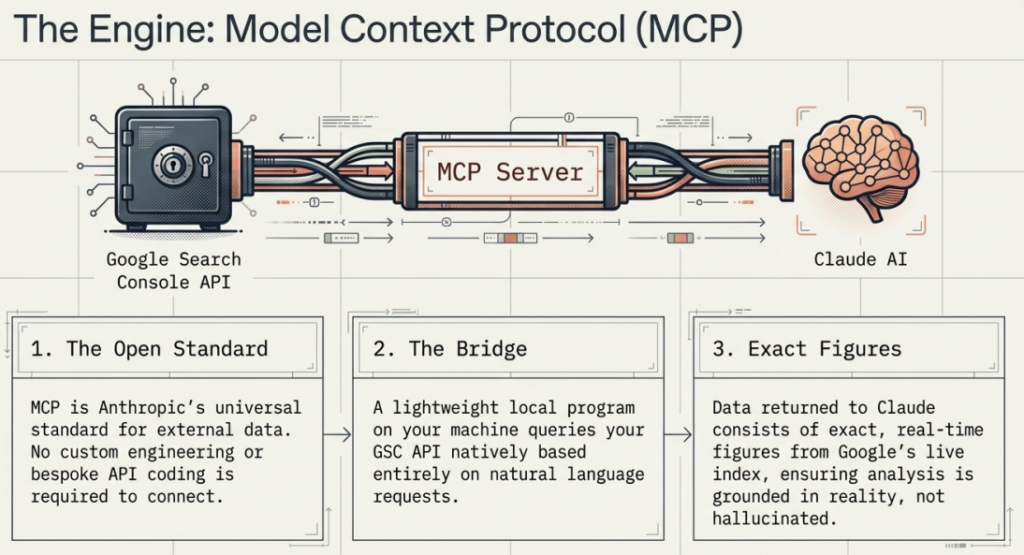
MCP, or Model Context Protocol, is an open standard created by Anthropic that allows Claude to connect directly to external data sources and tools. As Google Cloud describes it, MCP allows an AI model to request help from external tools to answer a query or complete a task. The analogy used most often in the developer community is a USB-C port for AI: a standardized connector that works with any compatible device.
Before MCP, connecting an AI model to an external data source required custom engineering work for each integration. Every new data source needed its own bespoke connection. MCP eliminates that by providing a single, universal standard that any AI application or data source can implement.
A Google Search Console MCP server is a small program that runs on your computer. When you ask Claude a question about your website’s SEO performance, Claude sends that question to the MCP server, which queries your actual Search Console account via the GSC API, retrieves the relevant data, and returns it to Claude. Claude then analyses the data and gives you a human-language response.
What the Integration Enables in Practice
Once connected, you can interact with your live Search Console data through natural language. Some examples of what becomes possible:
- Show me queries where my average position dropped more than three places compared to last month
- Which pages have more than 500 impressions but a CTR below 2 percent this quarter
- Inspect this URL and tell me whether it is indexed and mobile-friendly.
- Compare my performance on mobile versus desktop for my top 20 pages
- Which pages have been crawled but are not yet indexed, and what is the stated reason
The MCP server handles the API calls. The data returned are exact figures from Google’s own index, not estimates. Claude’s analysis of those figures is AI reasoning, which means you should always review significant findings before acting on them. But the numbers themselves are sourced directly from Google.
Three Setup Methods at a Glance
| Method | Technical Level | Best For | Real-Time Data |
| CSV Export to Claude Chat | No technical skill needed | Monthly analysis, one-off audits | No |
| Claude Desktop with MCP Server | Moderate: one-time setup | Ongoing monitoring, daily use | Yes |
| Claude Code with GSC API | Advanced: developer setup | Agencies, automation, multi-site | Yes |
Key Benefits of Claude Integration with Google Search Console
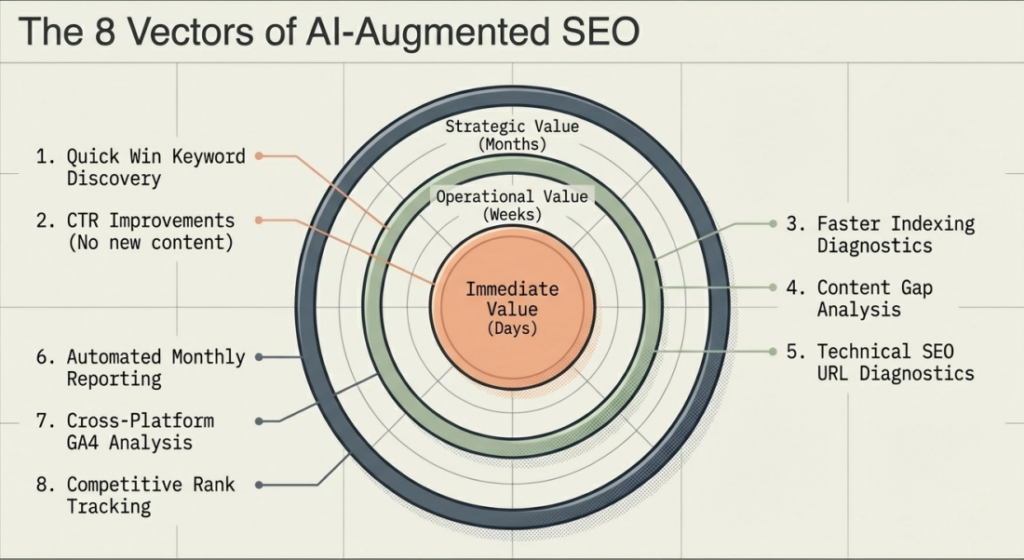
1. Keyword Opportunity Discovery in Minutes, Not Days
The most immediately valuable use case is what the SEO community calls quick wins: pages that already appear in Google’s index but rank just outside page one, typically between positions 5 and 20. A page in this range already has GSC impressions, which means Google is showing it for real queries. A relatively modest optimization push can move it onto page one and deliver a significant traffic uplift.
Claude identifies these opportunities automatically when given GSC data. Ask it to filter for queries above a minimum impression threshold with positions in that range, group them by topic, and rank them by estimated traffic uplift. What previously required an analyst to build a custom Excel formula and spend hours sorting now returns in a structured table in seconds.
2. CTR Improvements Without New Content
High impressions with low CTR is one of the most common and most fixable SEO problems. It means Google is showing your page in results, but searchers are choosing to click on a competing result instead. The fix is almost always in the title tag or meta description.
Claude can analyze your low-CTR pages, review the current title tags and meta descriptions, compare them against the competing headlines visible in SERPs for those queries, and generate specific rewrite suggestions. According to FirstPageSage, the top organic position captures 39.8% of clicks versus 18.7% for position two and 10.2% for position three. A well-executed CTR improvement campaign on existing ranked pages often delivers a better short-term return than new content creation.
3. Faster Indexing Diagnostics
Pages that are not indexed cannot rank. Indexing issues are often silent until they have already cost you traffic. With Claude connected to GSC via MCP, you can run plain-language diagnostics across your entire site: which pages are excluded from the index, what the stated reason is for each, and which categories of issue affect the most pages.
Claude can also cross-reference indexing status against page traffic importance, helping you prioritize fixes by business impact rather than alphabetically or by date. This is something no dashboard provides out of the box.
4. Content Gap Analysis Without Extra Tools
Content gap analysis, finding the topics your competitors rank for that you do not cover, traditionally requires a separate tool like Ahrefs or SEMrush. Claude allows you to approximate this analysis within a single conversation combines your GSC query data with topic mapping. Ask Claude to identify semantic clusters missing from your current keyword coverage based on your existing query data and the topic you want to own.
This integrates directly with the content cluster strategy outlined in DigiCobweb’s evergreen SEO guide, where a central pillar page on a broad topic links to supporting cluster content covering every relevant subtopic.
5. Automated Monthly SEO Reporting
Monthly reporting is the task most commonly cited by SEO agencies and in-house teams as their biggest time drain. Claude can take three months of GSC exports, compare period-on-period performance, surface the top trends and anomalies, and produce a structured narrative report, complete with prioritized recommendations, in under thirty minutes.
For DigiCobweb’s own client work, this means reports are delivered faster, with more consistent structure, and with actionable recommendations that go beyond what a manually produced data table can convey.
6. Technical SEO Diagnostics via URL Inspection
GSC’s URL inspection tool provides page-level detail, including indexed status, last crawl date, mobile usability, and structured data eligibility. When accessed through Claude via MCP, you can run bulk conversational inspections and receive structured diagnostic output for every URL you care about. Claude will also interpret what each issue means and suggest the specific fix required.
This workflow pairs powerfully with DigiCobweb’s technical SEO audit checklist, which provides the framework for how to prioritize and act on technical findings once they have been surfaced.
7. Cross-Platform Analysis with GA4
Some of the most valuable SEO insights emerge only when you compare GSC data against GA4. A page gaining impressions in GSC but losing sessions in GA4 may have a CTR problem. A page with high GA4 time-on-page but low GSC rankings may need more internal link equity. Claude can analyze exports from both platforms simultaneously, providing the joined-up picture that neither tool delivers on its own.
For a thorough understanding of GA4 acquisition channels and what they mean for your overall organic performance, DigiCobweb’s complete GA4 traffic sources guide covers every channel and how to interpret it in context.
8. Competitive Positioning and Rank Tracking Narrative
Beyond analysis of your own data, Claude can contextualize your GSC performance against industry benchmarks and explain what your ranking patterns suggest about your competitive position. A page with a CTR of 4.5% from position 3 is performing below the industry average for that position. Claude will notice that, name it, and suggest why it might be happening. This kind of contextual benchmarking is something manual analysis rarely surfaces unless you specifically go looking for it.
| Discover exactly where Claude AI and GSC can improve your rankings, traffic, and conversion. No obligation. |
| Get a Free SEO Audit from DigiCobweb |
How to Set Up the Integration: Three Methods Compared
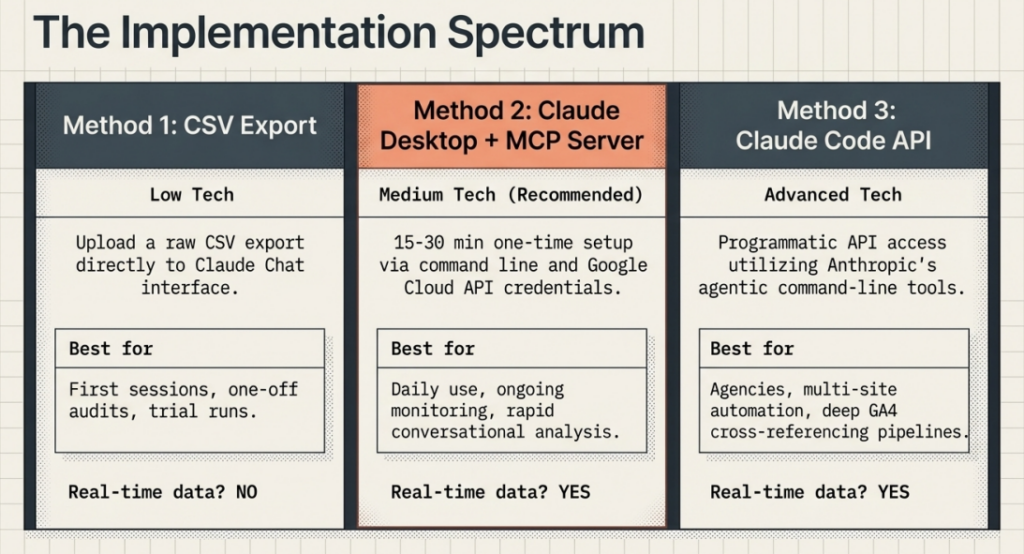
Method 1: CSV Export and Direct Upload (No Setup Required)
Who this is for: Anyone who wants to start immediately without touching a configuration file. Works on any device, any plan.
Time to first result: Under 10 minutes from scratch.
Step 1: Export Your GSC Data
1. Open Google Search Console at search.google.com/search-console and select your property
2. Click “Performance” in the left navigation, then select “Search Results” at the top
3. Set the date range to the last 90 days using the Date filter at the top of the report
4. Optional: apply a Country or Device filter if you want to focus on a specific segment
5. Click the Export button (top right) and choose Download CSV
6. For a complete picture, run two separate exports: one from the Queries tab and one from the Pages tab
Step 2: Open Claude and Upload
7. Go to claude.ai and sign in or create a free account
8. Start a new conversation by clicking New Chat
9. Click the paperclip or attachment icon in the message input area
10. Upload your CSV file. Claude will confirm it has received the file
11. If you exported both Queries and Pages CSVs, upload both files before asking your first question
Step 3: Ask a Specific, Goal-Oriented Question
The quality of Claude’s output depends almost entirely on the clarity of your question. Avoid vague requests like help with my SEO. Instead, describe exactly what you want to find and in what format you want it back.
✅ Your First Prompt
Try this after uploading your CSV: Review this 90-day Google Search Console data. Identify all queries where my average position is between 5 and 20 with more than 300 impressions. Group them by topic, rank by impression volume, and suggest a rewritten title tag for the top-priority page in each group. Return the output as a table.
Step 4: Iterate and Refine
Claude holds the full context of your uploaded data throughout the conversation. You can follow up without re-uploading. Ask it to drill deeper into a specific cluster, generate a second set of recommendations, or produce a summary you can paste into a client report. The conversation is your analysis session.
Method 2: Claude Desktop with a GSC MCP Server (Recommended for Regular Use)
Who this is for: SEO professionals who want live, real-time access to their GSC data without exporting CSVs. Ideal for daily monitoring, weekly reporting, and ongoing site management.
Step 1: Install Claude Desktop
Download and install Claude Desktop from claude.ai/download. This is the application that supports MCP server connections. The web version at claude.ai does not currently support MCP integrations.
Step 2: Create a Google Cloud Project and Enable the GSC API
1. Go to console.cloud.google.com and sign in with your Google account
2. Create a new project. Give it a name like Claude GSC Integration
3. In the search bar at the top, type Google Search Console API and press Enter
4. Click on the API result and then click Enable
5. Also enable the Web Search Indexing API if you want Claude to be able to submit URLs for indexing
Step 3: Create OAuth Credentials
OAuth is the recommended authentication method for personal and agency use. It lets you sign in with your existing Google account, which means Claude will only see the Search Console properties you already have access to.
6. In Google Cloud Console, go to APIs and Services, then Credentials
7. Click Create Credentials and choose OAuth 2.0 Client ID
8. Select Desktop App as the application type
9. Download the credentials JSON file and save it somewhere accessible
10. Note your Client ID and Client Secret as you will need these during MCP server setup
Step 4: Install a GSC MCP Server
An MCP server is the bridge between Claude Desktop and your GSC account. Several open-source options are available. His step-by-step guide covers both OAuth and service account authentication, with screenshots for every stage.
11. Install Node.js if you do not already have it (nodejs.org)
12. Run the installation command for the MCP server package in your terminal
13. Complete the OAuth flow in your browser to connect your Google account
14. Verify the connection is live by running the test command shown in the guide
Step 5: Configure Claude Desktop
15. Open Claude Desktop and navigate to Settings, then Developer or MCP Servers
16. Click “Add Server” and point it to your installed GSC MCP server
17. Restart Claude Desktop for the changes to take effect
18. Start a new conversation. You should now see the GSC tools listed in the available tools panel
19. Test the connection by typing: List all my Search Console properties
💡 What You Can Ask Once Connected
With live MCP access, you can ask the following: Show me my top 20 queries by impressions for the last 28 days. Which pages have a CTR below 2 percent but rank in the top 10? Inspect this URL and tell me if it is indexed. Compare my performance this quarter to the same quarter last year. Claude queries your real data and responds immediately: no exports, no dashboards, no waiting.
Method 3: Claude Code with the GSC API (Advanced Automation)
Who this is for: Digital marketing agencies, technical SEOs, and developers who want to automate reporting across multiple client accounts, build custom pipelines, or combine GSC data with GA4 and Google Ads in a single workflow.
Time to set up: Two to four hours for initial configuration. This requires basic comfort with command-line tools and API documentation.
Step 1: Install Claude Code
Claude Code is Anthropic’s command-line agentic tool. Install it with the following command in your terminal:
npm install -g @anthropic-ai/claude-code
You will also need an Anthropic API key from console.anthropic.com.
Step 2: Create a Google Cloud Service Account
For programmatic access across multiple client properties, a service account is more reliable than personal OAuth. A service account is a non-personal Google account that you add as a user to each Search Console property you want to access.
1. In Google Cloud Console, go to IAM and Admin, then Service Accounts
2. Create a new service account. Name it something like claude-gsc-reader
3. Assign it the Viewer role at minimum
4. Generate a JSON key file and download it. Store this securely
5. Go to each Search Console property and add the service account email as a user with at least Read and Analyze permission
Step 3: Set Up Your Project Directory
6. Create a new folder for your SEO analysis project
7. Place your service account JSON key file in this folder
8. Create a .env file containing your Anthropic API key and the path to the service account JSON
9. Run claude in your terminal from inside this folder to start a Claude Code session
Step 4: Connect to the GSC API and Pull Your Data
Inside a Claude Code session, describe what data you want in plain English. Claude Code will write the Python or Node.js script needed to authenticate, query the GSC API, and save the results to your project folder. For example:
PROMPT: Tell Claude Code what you want
“Connect to the Google Search Console API using the service account credentials in this folder. Pull the top 1,000 queries for my site [yourdomain.com] for the last 90 days, including clicks, impressions, CTR, and average position. Save the results as queries.json. Then analyse the data and identify the 20 highest-opportunity keywords where average position is between 5 and 20 and impressions are above 500.”
Step 5: Layer in GA4 and Google Ads
The same service account can be added to GA4 as a Viewer. This unlocks cross-platform analysis within the same Claude Code session. Add the GA4 property ID to your environment configuration and ask Claude to cross-reference GSC keyword data against GA4 bounce rates, session quality, and conversion data.
Agency Use Case
An SEO agency with 15 clients sets up one service account email and adds it to every client’s GSC and GA4 property. A weekly cron job runs a Claude Code script that pulls 30 days of data for all accounts, identifies performance changes across every site, and generates a structured report per client. What previously took a team of analysts a full day now runs automatically overnight.
Tools That Make the Integration Easier
The same service account can be added to GA4 as a Viewer. This unlocks cross-platform analysis within the same Claude Code session. Add the GA4 property ID to your environment configuration and ask Claude to cross-reference GSC keyword data against GA4 bounce rates, session quality, and conversion data.
You do not need to build any of this from scratch. A growing ecosystem of tools, MCP servers, and guides exists specifically to help SEO professionals connect Claude to their search data. These are the most reliable and well-documented options available today.
1. Suganthan’s GSC MCP Server (Free, Open Source, Recommended)
This is the most complete free GSC MCP server available for Claude Desktop. Built and maintained by Suganthan Mohanadasan, an experienced SEO professional and developer, this server ships with 20 built-in analysis tools covering four categories: analysis, monitoring, reporting, and indexing.
What it includes:
• Quick wins detection: automatically surfaces queries between positions 5 and 20 with high impression potential
• Content decay alerts: identifies pages that have been losing clicks or impressions over time
• Cannibalisation checker: flags multiple pages competing for the same query
• CTR benchmarking: compares your click-through rates against position averages to find underperformers
• URL indexing: submit pages directly to Google’s indexing API from within a Claude conversation
• Multi-site dashboard: manage multiple Search Console properties from a single session
• Interactive charts: visualise data directly inside Claude Desktop without switching tools
• OAuth authentication: sign in with your Google account, no complex service account setup needed
The setup guide at suganthan.com/blog/google-search-console-mcp-server/ covers every step with screenshots, troubleshooting notes, and guidance for both personal and agency use. Total setup time is approximately 15 minutes. No subscription, no credit card, no usage limits.
⭐ Why We Recommend This First
Suganthan’s server is the only free GSC MCP tool that combines OAuth simplicity, 20 pre-built SEO tools, interactive visualizations, and proactive alerting in a single package. For any SEO professional who wants live Claude-to-GSC access without writing code or paying for a SaaS subscription, this is the right starting point.
2. Composio MCP Tool Router (For Teams and Agencies)
Composio is a managed MCP infrastructure platform that provides a cloud-hosted GSC MCP server, removing the need to run anything locally. It is particularly well-suited for agencies that need to manage multiple client Google accounts or for teams where not everyone is comfortable with local server configuration.
Composio handles OAuth token management, refresh logic, and API reliability automatically. You connect your Search Console account once, and Claude Code or Claude Desktop can then access it via a secure URL rather than a local process. Composio’s setup guide for Claude Code walks through the full configuration.
• No local installation required: the MCP server runs in Composio’s cloud
• Multi-account support: connect and switch between multiple GSC properties
• SOC 2 Type 2 compliant: all tokens and credentials are encrypted at rest and in transit
• Compatible with both Claude Code and Claude Desktop
• Free tier available with usage-based pricing for higher volumes
3. Coupler.io (Automated Data Sync for Analysis Workflows)
Coupler.io takes a different approach: instead of an MCP server, it synchronizes your GSC data on a scheduled basis (every 15 minutes, hourly, or daily) and makes it available to Claude in formatted files. This is useful for teams that prefer to work with stable, versioned data snapshots rather than live API queries.
Coupler.io can also blend GSC data with GA4, Google Ads, and other marketing platforms before passing it to Claude, enabling the kind of cross-platform analysis that normally requires a custom data pipeline. Their Claude to GSC integration page documents the full setup.
• Schedule automatic syncs at intervals from 15 minutes to monthly
• Combine GSC data with GA4, Ads, social platforms, and CRM data in one dataset
• No API knowledge required: the sync is configured through a visual interface
• Useful for teams that want a data warehouse approach rather than live queries
4. Windsor.ai (Natural Language SEO Analysis via Dashboard Sync)
Windsor.ai provides a connector that pulls your GSC data into an environment where Claude can analyze it through natural language. It is positioned specifically for marketing teams who want conversational access to their organic search data without any developer involvement.
The platform supports queries like “Claude, analyze the query and page dimensions over the last 30 days.” Identify any instances where multiple URLs are ranking for the exact same query. It is available through Windsor.ai’s Claude integration page.
• No CSV exports or API configuration required
• Sync frequency configurable from daily to real-time
• Designed for non-technical marketing teams
• Supports Google Ads, Meta Ads, and GA4 alongside GSC data
5. Adzviser (MCP Server for GSC with Unlimited Queries)
Adzviser provides a hosted MCP server that connects Claude directly to Google Search Console and other marketing platforms. It offers unlimited account connections and unlimited MCP queries, making it a cost-effective option for agencies managing many client properties simultaneously.
The platform focuses specifically on the data access layer, connecting Claude to your Search Console account via Adzviser’s MCP server so Claude can query impressions, clicks, CTR, position data, and crawl errors without any per-query cost.
• Unlimited Google Search Console account connections
• Unlimited MCP queries with no per-request pricing
• Supports Google Ads, GA4, and Facebook Ads alongside GSC
• Hosted solution with no local server setup
| Tool | Type | Technical Level | Cost | Best For |
| Suganthan’s GSC MCP Server | Local MCP Server | Low (OAuth login) | Free | Individual SEOs, freelancers, agencies |
| Composio | Cloud MCP Router | Low (cloud setup) | Free tier + paid | Teams, agencies, multi-client work |
| Coupler.io | Scheduled Data Sync | None (visual interface) | Paid (free trial) | Data warehouse and blended analytics |
| Windsor.ai | Dashboard Connector | None | Paid | Non-technical marketing teams |
| Adzviser | Hosted MCP Server | Low | Paid | Agencies with many client accounts |
| Claude Code + GSC API | Direct API + AI Code | Advanced | API usage cost | Developers and technical SEO teams |
Start Here
If you are new to this integration, begin with Suganthan’s free GSC MCP server guide. It provides the fastest path from zero to live conversational access to your Search Console data with Claude Desktop, at no cost. You can always layer in more sophisticated tools once you have established the workflow.
Real Prompts You Can Use Right Now
The quality of what Claude returns depends significantly on how clearly you define your goal. Vague prompts return vague answers. Specific, goal-oriented prompts return specific, actionable output. Below are eight copy-paste prompts tested against real GSC data.
Prompt 1: Quick Win Keyword Identification
PROMPT: Find page-two ranking opportunities
“Analyse this Google Search Console data. Identify all queries where my average position is between 5 and 20 with more than 200 impressions. Group the results by topic cluster. For each cluster, tell me which page currently ranks, what the combined impression total is, and what the average CTR is. Sort the output by estimated traffic opportunity, highest first.”
Prompt 2: CTR Improvement Analysis
PROMPT: Rewrite underperforming title tags and meta descriptions
“From this GSC data, identify the 15 pages with the highest impression count but a CTR below 2.5 percent. For each page, show me: the current URL, the likely current title tag based on the page path, the queries driving the most impressions, and three suggested title tag rewrites that better match searcher intent. Make each title tag under 60 characters and include the primary query naturally.”
Prompt 3: Indexing Issue Prioritisation
PROMPT: Prioritise indexing fixes by business impact
“I have uploaded my GSC coverage report and performance data. Cross-reference the pages excluded from Google’s index against the pages that previously generated the most organic clicks. Identify which excluded pages represent the highest potential traffic loss. For each, state the exclusion reason and the recommended fix. Sort by estimated lost traffic value.”
Prompt 4: Content Decay Detection
PROMPT: Find content that is losing ground
“Compare this GSC data across the two date ranges I have uploaded. Identify all pages that experienced a drop in average position of more than three places between the two periods. Group the declining cannibalization ages by content type and estimate whether the drops are likely caused by algorithm sensitivity, cannibalization, or competition. Suggest a priority order for addressing each group.”
Prompt 5: Topic Cluster Gap Analysis
PROMPT: Identify missing content topics from existing keyword data
“Review the search queries in this GSC data that are driving impressions to my site. Identify semantic topic clusters where I appear to have partial coverage only, meaning I rank for some queries in a topic area but not others. For each gap cluster, suggest a content title, target query, and recommended word count that would complete my coverage of that topic.”
Prompt 6: Monthly SEO Report Draft
PROMPT: Generate a narrative monthly SEO report
“Using the two GSC exports I have attached, one for this month and one for the same month last year, write a structured SEO performance report for a non-technical client audience. Include an executive summary of overall traffic performance, the top five pages by growth, the top five pages by decline, the top new keywords driving traffic this month, and three specific recommendations for next month. Use clear, jargon-free language throughout.”
Prompt 7: Device Performance Analysis
PROMPT: Compare mobile versus desktop SEO performance
“Analyse this GSC data segmented by device. Compare click-through rate and average position for mobile versus desktop across my top 50 pages by total impressions. Identify pages where mobile performance is significantly weaker than desktop. For those pages, suggest whether the issue is likely a technical mobile usability problem, a content mismatch, or a title and description that does not appeal to mobile intent.”
Prompt 8: Cannibalisation Check
PROMPT: Identify keyword cannibalisation across pages
“Review this list of URLs and their top-ranking queries from GSC. Identify instances where two or more pages are competing for the same primary keyword or very similar queries. For each cannibalization case, state which page appears stronger based on click and impression data, and recommend whether to consolidate, redirect, or differentiate the competing pages.”
Common Mistakes to Avoid
The integration between Claude and Search Console is powerful, but it is easy to use it in ways that waste time or produce misleading results. These are the mistakes most commonly made by teams adopting this workflow for the first time.
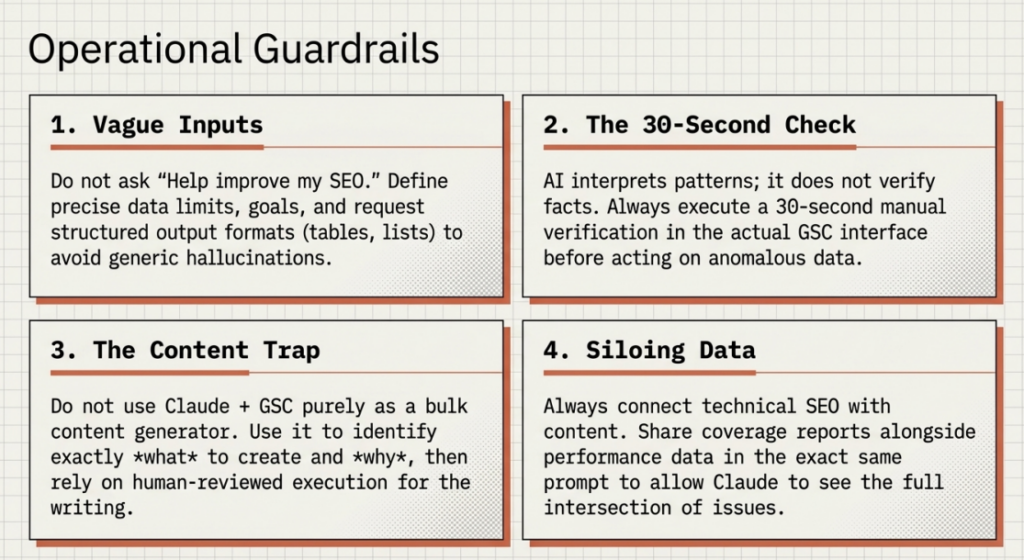
1. Asking Vague Questions and Expecting Specific Answers
If you ask Claude to help improve my SEO, you will get a general response. Claude is most valuable when you give it specific data, a clear goal, and a defined output format. Always state what data you are sharing, what you want to find or achieve, and how you want the output structured. The prompts in the previous section are designed to model this.
2. Treating AI Interpretation as Ground Truth
Claude’s analysis of your GSC data is grounded in the actual numbers returned from Google, which are accurate. But Claude’s interpretation of why a metric changed, for example, attributing a position drop to a specific algorithm update, involves reasoning from patterns rather than verified facts. Always treat Claude’s causal explanations as hypotheses to investigate, not conclusions to act on immediately.
3. Using Claude as a Content Generator Rather Than an Analyst
The most valuable use of Claude with GSC data is strategic analysis and prioritization. Using it primarily to generate bulk content from keyword lists misses the point and produces SEO work that does not align with your actual performance data. The right workflow is to use Claude to identify what to create and why, then produce high-quality, human-authored or carefully reviewed content for those opportunities.
4. Skipping the Validation Step
After Claude identifies an opportunity or flags an issue, always verify it in your actual GSC interface before acting. Claude can occasionally misread column headers in unusual CSV formats or make rounding errors when working with large datasets. The diagnostic conversation saves you hours of search time, but the final verification is a 30-second check that confirms the finding before you prioritize it.
5. Ignoring the Integration Between Technical and Content SEO
One of Claude’s most underused capabilities is connecting technical issues with content performance. A page with declining rankings might have a technical cause, a content cause, or both. By sharing both your coverage report and your performance data in the same conversation, you allow Claude to reason across both dimensions simultaneously. Teams that analyze them separately miss the intersections where the biggest gains often hide.
⚠️ One More Important Note
Google’s own guidance on using AI in SEO is clear: AI tools are acceptable as part of a content and strategy workflow. What matters is the quality and helpfulness of the final result that users experience. Using Claude to analyze your Search Console data and inform your strategy is no different in principle from using any other analytics platform. The output that matters to Google is the quality of your website content and user experience, not the tools you used to develop your approach.
The Future: Claude AI for SEO Beyond Google Search Console
Google Search Console will remain the most important data source in any SEO workflow for the foreseeable future. But the landscape around it is changing faster than at any point in the past decade, and understanding where Claude fits in that broader shift is essential for any SEO team planning beyond the next quarter.
The Rise of Generative Engine Optimisation
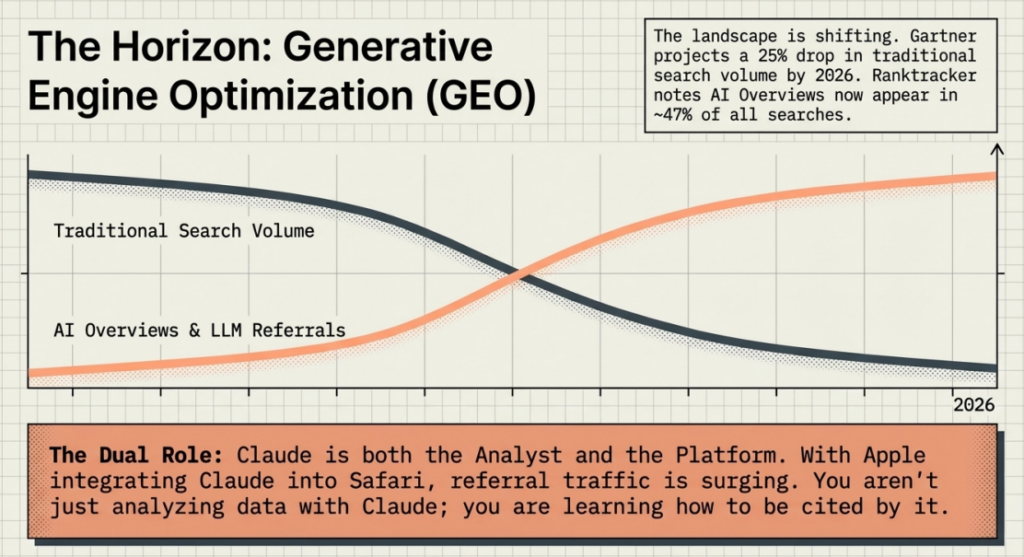
A new discipline is emerging alongside traditional SEO: Generative Engine Optimization (GEO), sometimes also called Answer Engine Optimization (AEO) or Large Language Model Optimization (LLMO). It refers to the practice of structuring your content so that AI systems, including ChatGPT, Google AI Overviews, Perplexity, Claude, and others, are more likely to cite it when generating responses to user queries.
The numbers make GEO increasingly urgent. According to Gartner’s projections, traditional search engine volume is forecast to drop by 25% by 2026 as AI-powered answer engines capture more discovery traffic.
Claude as Both Analyst and Platform
This creates a unique dynamic: Claude is simultaneously the tool you use to analyze your GSC data and a platform whose citation behavior you want to influence as a content creator. As LLMrefs notes in their GEO guide, Claude tends to synthesize information rather than quote directly and favors well-structured, logical content. The same content practices that improve your GSC performance, clear structure, demonstrated expertise, and direct answers to specific questions also improve your likelihood of being cited by Claude when it generates responses.
Search Console Is Evolving to Reflect AI Search
Google’s own Search Console introduced separation of AI Overview impressions and clicks from traditional organic data. This means that your GSC account will increasingly become the measurement layer for your visibility not just in traditional search but in Google’s own AI-generated responses. As that data matures, using Claude to analyze it becomes even more powerful, because you will be able to understand and improve your citation rate in AI Overviews through the same analytical workflow you already use for traditional rankings.
The Compounding Advantage of Starting Now
The SEO teams investing in Claude-augmented workflows now are building something more valuable than a faster analysis process. They are building institutional knowledge about which content structures, topic approaches, and optimization tactics translate into both traditional rankings and AI citation visibility. That knowledge compounds. As Enrich Labs observes in their GEO research, GEO is where SEO was in 2010: a recognized opportunity with a rapidly closing first-mover window.
Businesses that build AI-augmented SEO workflows are not just optimizing for the current search landscape. They are building the foundation for visibility in a search environment where AI-generated answers, not ranked lists of links, are increasingly how people discover content and make decisions.
Conclusion
Google Search Console has always contained the answers to your most pressing SEO questions. The challenge has never been the data. It has been the time, the analytical bandwidth, and the strategic clarity required to translate thousands of rows of numbers into decisions that move rankings.
Claude AI by Anthropic changes that equation in a practical and immediate way. Whether you start with a simple CSV upload to claude.ai, configure a live MCP connection through Claude Desktop, or build an automated multi-source pipeline with Claude Code, the integration between Claude and Search Console gives you a fundamentally more capable SEO workflow than anything built on manual analysis alone.
The businesses that win in organic search over the next two years will be those that act on better insights, faster. The tools to do that are already available. The only question is whether you are using them. At DigiCobweb, we help businesses build AI-augmented SEO strategies that combine the precision of first-party data with the speed of Claude-assisted analysis. If you want to see what this approach could deliver for your website specifically, get in touch.